Tutorial
Follow these steps after saving your live-looking edge wallpaper.
- Tap Set Wallpaper, then open Photos.
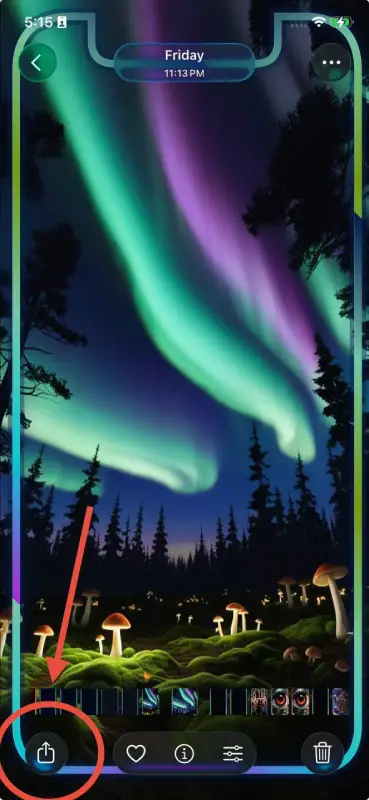
- Choose the live photo, then tap Share.
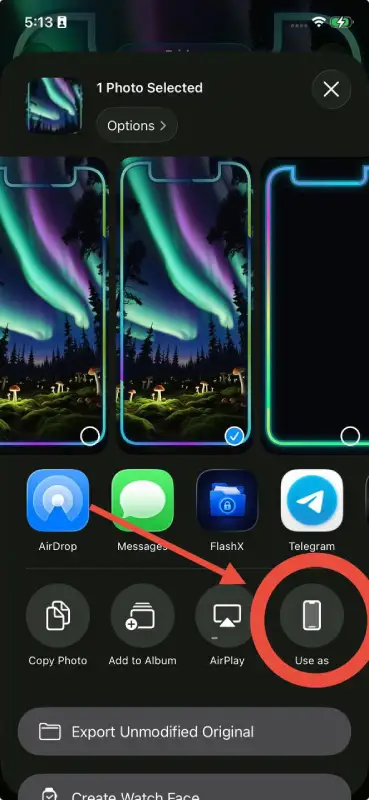
- Tap Use as Wallpaper.
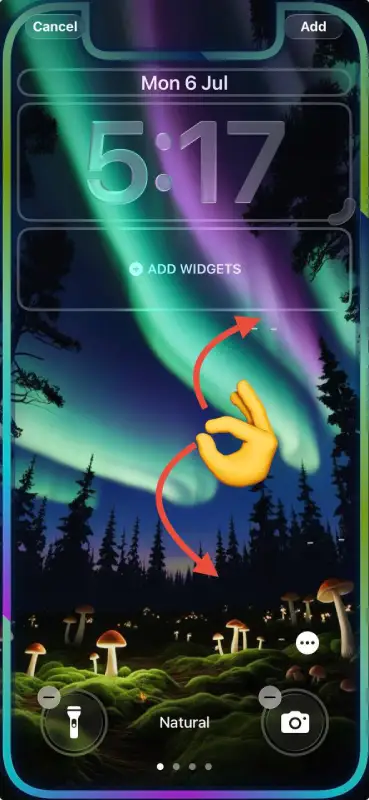
- To activate motion, tap the Live Motion icon at the bottom.

- Tap Add on the top right.

Tip. What if the Live Photo does not move?

Case when Live Motion is not available
- Use videos with minimal screen movement and no strong scene transitions for the best chance that iOS accepts motion on the Lock Screen.
- Turn off Low Power Mode. When Low Power Mode is enabled, iOS can hide or disable the Live Motion control.
If the edge is slightly cropped in the iOS wallpaper editor, pinch out a little or return to the app and increase iOS Zoom Fix before saving again.